AUTOMOTIVE & AFTER-SALES

A clearer journey. From reception to after-sales.

Workshop reception, spare parts and sales each bring different requests. Ignite QMS helps dealerships and automotive service centres in Algeria organise walk-in reception with the right queue for each visitor.

Software + hardware · Server PC included
The right team for every request.
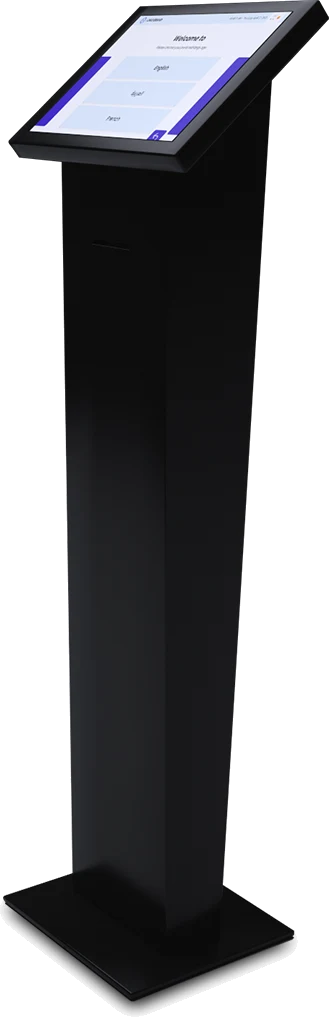
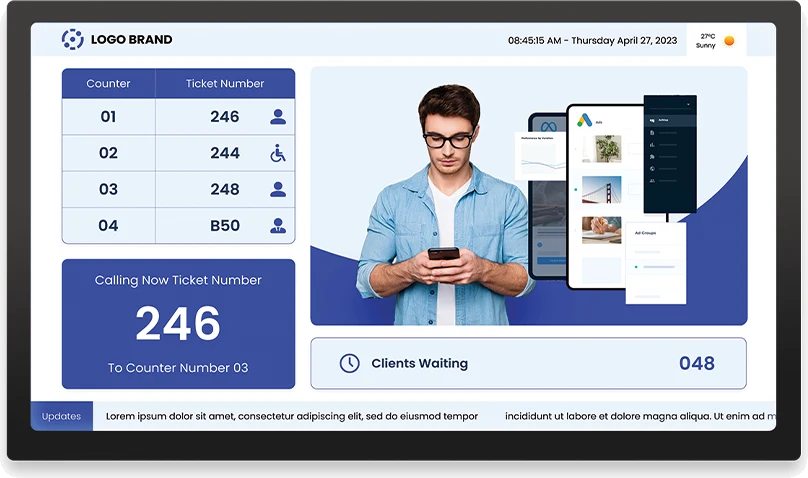
Ignite QMS display showing ticket and counter numbersIgnite QMS Standard touchscreen ticket dispenser
YOUR TICKETS024One number.
The right service.
Illustrative example
EXAMPLE SERVICES
  • Workshop reception
  • Spare parts
  • Sales

A client reference in Algeria’s automotive sector

  • Toyota
Our clients

YOUR RECEPTION, EVERY DAY

Keep different reception requests organised.

01

Separate reasons for visiting

Distinguish workshop, parts and sales enquiries from the moment a visitor arrives.

02

Help advisers manage calls

Use the agent interface to call, recall and transfer visitors between reception counters.

03

Review reception workload

Ticket and service-time reports show activity at your reception posts.

A SIMPLE JOURNEY

From arrival to the right service adviser.

The following is an example workflow. We define service names and counter assignments with your team around the way your site operates.

  1. 01

    Choose a service

    The visitor selects the reason for their visit at the ticket dispenser, or a receptionist issues a ticket for the right service.

  2. 02

    Receive a queue number

    The ticket identifies the number and service, giving the visitor a clear reference while waiting.

  3. 03

    Receive the call

    The agent calls the next ticket from their workstation, with options to recall or transfer the visitor.

  4. 04

    Go to the right counter

    When a calling display is included, it shows the ticket and counter number alongside a voice announcement.

Actual Ignite QMS software screenshot. Services and workflows are configured for your organisation.

Plan my visitor journey

IGNITE QMS SOFTWARE

Tools for dealership and service reception.

Services and counters

Set up queues around your services and assign the relevant counters.

Call and recall

Agents call the next visitor and view waiting tickets and service history.

Branded tickets

Add your logo, contact details and welcome message to the ticket number and service.

Multilingual announcements

Call ticket numbers in Arabic, French or English, with a male or female voice.

Counter transfers

Move visitors to another service counter when their visit requires a further step.

Reports and statistics

Review processed tickets and service times to understand reception activity.

Explore the software

SOFTWARE + HARDWARE

Three packages.
Built around your reception.

Choose Essential when a receptionist issues tickets from a compatible PC supplied by your organisation. Standard and Premium offer a touchscreen ticket dispenser for self-service arrivals. Every package includes the software and a dedicated server PC; the calling display is optional.

01 / ASSISTED RECEPTION

Essential

The receptionist hands over the ticket.

  • Complete Ignite QMS software
  • Ticket printer
  • Dedicated server PC included

Reception PC supplied by the client, subject to compatibility.

Essential quote
02 / SELF-SERVICE KIOSK

Standard

Visitors select their service.

  • Complete Ignite QMS software
  • Black 15.6″ touchscreen dispenser
  • Integrated printer
  • Dedicated server PC included

A configuration for self-service reception.

Standard quote
03 / LARGE-FORMAT KIOSK

Premium

An imported, large-format kiosk.

  • Complete Ignite QMS software
  • 21″ Full HD touchscreen dispenser
  • Integrated printer
  • Dedicated server PC included

A larger screen for your reception area.

Premium quote

TV queue display available as an option on request.
Additional equipment and agent workstations are specified in your quote.

View specifications

BEFORE YOUR PROJECT

Your questions.
Our answers.

Can we create queues for workshop, parts and sales?

Yes. Services can follow the structure of your dealership and the reception counters available.

Does Ignite QMS manage vehicle repairs?

No. The solution described here organises reception queues and counter calls. It does not replace workshop planning or repair management software.

Can a visitor be transferred to a different adviser?

Yes. The counter interface supports transfers when a visitor needs another service.

Which ticket dispenser should a dealership choose?

Standard offers a 15.6-inch touchscreen; Premium offers a larger 21-inch Full HD screen. Essential is suitable when a receptionist issues tickets from a compatible PC.

Can it connect to our dealership management system?

Tell us which system you use and the exchanges required. Any integration is assessed and quoted separately.

Plan your dealership’s reception.

Tell us about workshop reception, spare parts, sales and the counters involved at your site in Algeria.

  1. 01 We discuss your requirements.
  2. 02 We define your configuration.
  3. 03 You receive a tailored proposal.
SARL CECIYour project with
SARL CECI · Ignite QMS

Request your quote

Add project details Optional

By submitting this form, you ask us to contact you about your project. .

* Required fields

WhatsApp

Ignite QMS

Your data. Your project.

We use the information in this form to understand your requirements, contact you and prepare an Ignite QMS proposal. Required fields identify your organisation and provide a way to reach you.

Who receives your enquiry?

Your enquiry is sent to Ignite Technologies and CECI for the commercial follow-up of your project in Algeria. Enquiries are stored through Netlify Forms and a notification is sent to info@igniteae.com.

Only the information we need

Your enquiry is intended for the team handling your project. Please do not include medical or sensitive information. Contact us with questions about retaining or deleting your data.

Measurement and external services

Campaign parameters in the link may accompany your enquiry to identify its source. Google Ads uses cookies and receives technical browsing data, advertising click identifiers and quote-request, WhatsApp-click and phone-click events to measure our advertising. This tracking loads automatically. Form-field contents are not sent to Google by this tracking. Personalised advertising and enhanced conversions are not enabled. TWIPLA also measures visits and browsing on this site. The YouTube video only loads when you ask to play it. Phone and email links open the relevant applications.

Questions about your data?

Write to contact@ceci-dz.com with any questions or requests about the information you share with us.